I Have a Speed Addiction…
I’ll admit it: I have a serious addiction to speed. No, not the illegal kind. I’m talking about blazing-fast build times, runtime performance, and bundling. And my enabler? Bun.
Bun has become my go-to for everything: build runtime, bundler, package manager-you name it. It’s like the Swiss Army knife of JavaScript tooling, and I’ve been using it as a drop-in replacement for Node.js in all my projects. Sorry, Deno. I gave on you awhile ago.
Today, I’m going to show you how to configure Cloudflare Workers to use Bun. Why? I couldn’t find any docs on this so I’ll make my own.
Configuring Cloudflare Workers with Bun 🛠️
Cloudflare Workers recently added support for Bun as a build runtime, which means you can now harness its speed and simplicity in your serverless projects. Here’s how to set it up:
1. Specifying the Bun Version
First, you’ll want to tell Cloudflare which version of Bun to use. This is done by setting the BUN_VERSION environment variable in your Cloudflare Workers project settings.
- Go to Settings > Build > Build Variables and Secrets in your Cloudflare dashboard.
- Add a new variable:
Key:BUN_VERSION
Value:1.1.33(or whatever version you prefer).
2. Skipping Automatic Dependency Installation
By default, Cloudflare tries to run npm install during the build process. But we’re using Bun, so we don’t need that. To skip this step:
- Add another build variable:
Key:SKIP_DEPENDENCY_INSTALL
Value:true(or1).
This tells Cloudflare to chill out and let you handle dependency installation yourself.
3. Custom Installation Command
Now that you’ve skipped the automatic dependency installation, you can take full control of the process. Use the bun install command to install your dependencies lightning-fast.
Here’s what your build command might look like:
Build command
bun installDeploy
bun wrangler deployRerun your build and watch the magic happen.
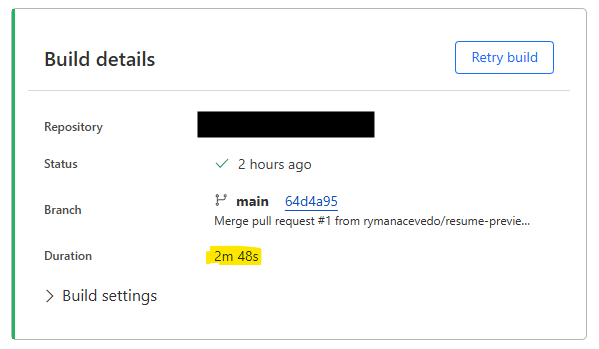
Before Bun
After Bun
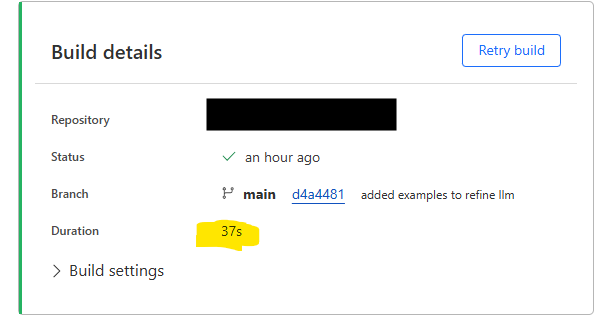
A 78% increase!